Trouble Logging in?
If you’re having trouble logging in to your account, refer to the below cases that applies to you and follow the troubleshooting steps to retrieve your Surview account.
You forgot your Surview account password
You can reset your password by the following steps:
- Go to Log in page and click on forget password.
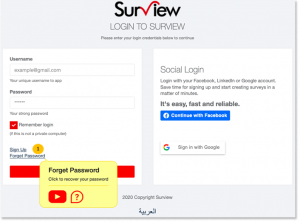
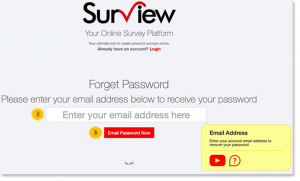
- Enter the registered email address in Surview.
- Click on “Email Password Now”
- Go to your email inbox, your registered email address will receive a message containing a temporary account password. (You can change this afterwards with your preferred password.)
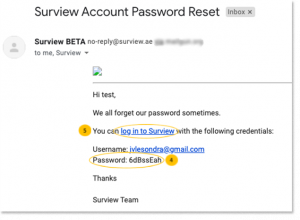
- You can now log-in to your account through this link.
- Click here to learn how to change your password.
You forgot your Surview account User Name or Email Address
Since your registered email address serves as your username in Surview, so if you forgot it, you won’t be able to retrieve your account. If this happens, you can contact our Surview team for assistance at the below contact details.
You did not receive the Password Reset Email
It will only take maximum of 10 minutes for the password reset email to be received in your registered email address. If it will take more than this, the email might be in your spam or junk folder, or it’s being filtered by your email security settings.
To solve this problem:
- Add info@surview.ae to your list of safe sender emails.
- By whitelisting our details in your email account, our emails will not be filtered and you’ll be able to receive it instantly. If you are not sure how to whitelist, simply pass this info to your IT department.
- Re-try the forgot password steps again.
- You can contact our Surview team for assistance.
Reset my password and can’t log in
Check that you’re entering the correct username for the account you’re trying to access, or make sure that you’re entering the correct and updated password. Also ensure that your browser is not keeping outdated log in information. Clear out your cache and cookies. You may try to close and restart your Surview page and then you may try to log in again with your new password.
CONTACT US:
Please send your feedback, comments, requests for technical support:
By email: cx@surview.ae
By phone number: +971 4 333 0322
No Surview account yet? Sign up here for Free – and create your own survey!