Assigning Numerical Values to Answer Choices
To help you analyze the results, here are some ways you can assign numerical values to answer choices:
- Enable the Basic Statistics to assign each answer choice a numeric value. Using these values, the minimum, maximum, mean, median,and standard deviation for the question will be calculated.
- Assigning numerical values to answer choices with Matrix / Rating Scale question type. Weighted average will be calculated that helps you to examine your data in a way that includes the responses of every single person who answered a question.
To add weights to answer choices:Go to the Design Survey tab and select the Matrix/Rating Scale Question that you made or click here to make one.
- Click the Options tab.
- Under the Matrix – Weight Distribution, edit the values for each answer options.
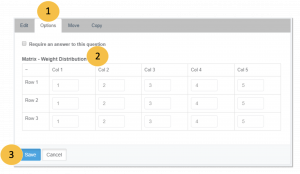
- Click Save.