All Surveys Section
All Surveys section is the first part of the user’s dashboard. In this section, you can view a list of your existing and on-going surveys.
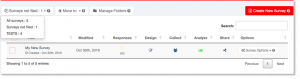
All Surveys Section Menus:
 – dropdown menu of your folders with number of surveys in each folder.
 – move selected surveys to specific folder.
 – organize surveys by creating new folder.
 – create new survey to collect responses and analyze results.
 – dropdown menu for the number of entries to be shown. You may select from 10, 25, 50 and 100 number of items.
 – you can search for a specific survey on your list.
- Column Titles:
- Title – the name of your survey.
- Modified – shows the date of when the last changes have been made to your survey.
- Responses – displays the number of responses collected for a survey.
- Design – here you can design your survey, edit questions, add logic and more.
- Collect – manage respondents, create collectors and send invites to respondents.
- Analyze – analyze results for collected data.
- Share – you have the option to share the survey with your team.
- Options – here you can perform the several Survey Options such as: Send a copy, Transfer a survey, Create a template, Clear responses, Delete a survey and Clone a survey.
Survey Options:
- Clone a survey – allows you to make a copy of an existing survey with ease.
- Send a copy – you can send a copy of your survey to another surview user, everything will be sent (pages, questions, logic information, etc.) except responses collected for the survey.
- Transfer a survey – this option will delete the survey from your list and transfer everything from you to other user including responses you collected for this survey.
- Create a template – this option will keep the survey and make a template of this survey as well.
- Clear responses – this option will delete all responses collected for the survey so far.
- Delete a survey – you can delete a survey from your list and this action is undoable.
Note: You can save your survey templates in My Templates Section.
*Sign up here for Free – and create your own survey!