Adding Weights to Survey Responses
Adding a weight to each answer option helps you to examine your data in a way that includes the responses of every single person who answered a question.
Matrix – Weight Distribution
This option allows you to add your own custom weight for each answer option in the scale.
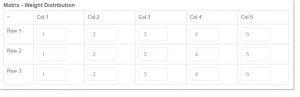
As shown in the screenshot above, the values are set at 1-5 by default. You may change the values at your own customized weights.
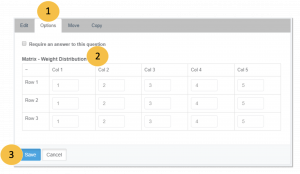
To customize the weight distribution:
Go to the Design Survey tab and select the Matrix/Rating Scale Question that you made or click here to make one.
- Click the Options tab.
- Under the Matrix – Weight Distribution, edit the values for each answer options.
- Click Save.